



gTasks Pro is a paid task management app for iOS that synchronizes with Google Tasks and provides offline access.
The App DNA
What makes this app unique?
Users choose this app to avoid recurring subscription costs while maintaining a Google-centric workflow across their Apple devices.
For Productivity-focused users who rely on Google Tasks and require offline access or location-based reminders across multiple Apple devices.
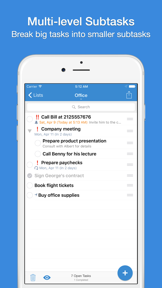
What does it look like?
Key features
Bi-directional synchronization of task lists and subtasks with Google account data.
Triggers notifications based on GPS coordinates when arriving at or leaving specific locations.
Caches task data locally for management without an active internet connection.
How much does it cost?
Paid model with a one-time $19.99 fee, positioning the app as a utility purchase rather than a recurring subscription.
Velocity
Maintenance developmentperformanceopaqueShow more...
Development is currently focused on stability, with the latest release and preceding updates providing only generic performance improvements. The Android platform shows a consistent, low-frequency update pattern, while the iOS platform has remained untouched for over 1,000 days. There is no evidence of new feature development or live operations, indicating a long-term maintenance strategy. The publisher utilizes opaque release notes, providing no insight into specific technical changes or underlying improvements.
Who built it?
JulyApps
11 apps tracked · Productivity
 Will it Snow? PRO Notification
 Easy Message for WhatsApp
 gTasks for Google Tasks
 Lock Notes - Passcode Protect
 Will it Rain? - Notifications
 Will it Snow? - Notifications
 Cal List - Calendar in a list
 Lock Notes Pro
 Will it Rain? PRO Notification
 Easy Tasks - Todo & Reminders
User Sentiment
What do users think recently?
Recent user voice shows a mixed sentiment. Users appreciate simple and intuitive task management interface allows users to organize personal and professional projects effectively and integration with other productivity tools like calendar and notes provides a unified workflow for daily planning, but report unreliable notification delivery causes users to miss time-sensitive tasks and important daily reminders post-update.
How are ratings & reviews evolving?
What users say, by theme
- Simple and intuitive task management interface allows users to organize personal and professional projects effectively
- Integration with other productivity tools like calendar and notes provides a unified workflow for daily planning
- Unreliable notification delivery causes users to miss time-sensitive tasks and important daily reminders post-update
99 of 99 recent reviews analyzed · high confidence · Mixed overall
Read the full review analysisUnlock 2 more frustration themes and 2 user requests, each backed by review evidence.
Access the full report for freeCompetition
Competitive landscape for gTasks Pro for Google Tasks
How's the Productivity market?
The app maintains a presence in the Productivity category across multiple global markets, though its rank fluctuates significantly. The $19.99 price point positions it as a premium utility, yet it faces constant pressure from free, high-velocity rivals like Microsoft To Do.
Read the market outlookThe rivals identified

By Microsoft Corporation
Microsoft To Do is the direct market leader for Google Tasks users, offering a superior cross-platform ecosystem and deep integration with the Microsoft 365 suite.
- Deep integration with Outlook and Microsoft 365 ecosystem provides a seamless workflow for enterprise users
- Offers robust cross-platform synchronization across Windows, macOS, iOS, and Android without requiring a paid subscription
- Includes advanced task management features like file attachments and shared lists that Google Tasks lacks


Unlock the head-to-head verdict: where this rival wins, and where it loses.
Access the full report for freeThe Analyst's Read
Key takeaways for gTasks Pro for Google Tasks
Where is it heading?
The productivity market is consolidating around free, cross-platform tools that offer high-frequency feature updates. gTasks Pro's maintenance-mode cadence leaves it exposed to churn, as users increasingly prioritize reliability and feature parity over the one-time purchase model.
- Persistent notification failures in the latest release drive high churn, which compounds the rating drag already visible on the platform.
- The lack of feature velocity compared to Microsoft To Do's rapid update cadence leaves the app vulnerable to user migration.
The SWOT
- One-time purchase model removes recurring cost friction.
- Offline sync removes connectivity dependency.
- Search bar implementation would improve list navigation.
- Advanced formatting options would increase feature parity.
Next best moves
Rebuild notification delivery logic because it is the top-cited churn reason in reviews → stabilize daily active habit.
+ 1 more prioritized moveThe counter-intuitive read
The app's maintenance-mode status is a competitive advantage in the productivity space…
Read the full takeFeature gaps
Real-time collaboration (available in Microsoft To Do but absent here) +1
Since the last report: The app's competitive outlook has shifted from mixed to declining due to a lack of feature velocity and persistent, unresolved technical bugs. The product remains in a maintenance phase, with no major updates for over 100 days, leaving it increasingly vulnerable to free, high-frequency competitors.
Bottom line
The app's one-time purchase model is a strong differentiator, but it cannot sustain the user base while core functionality remains broken. Stabilizing notification and recurring task logic is the only way to defend the current user base against free, high-velocity rivals.
Unlock 2 critical frictions, 2 market threats, 1 more prioritized move and the analyst’s take.
Access the full report for freeFAQ
Is gTasks Pro worth paying for if I already use Google Tasks for free?
How does gTasks Pro compare to Microsoft To Do?
Does gTasks Pro have intrusive ads?
What is a free alternative to gTasks Pro?
Sources
Report last updated