





Microsoft To Do is a task management app for individuals and professionals, available across web, iOS, Android, and Windows.
The App DNA
What makes this app unique?
Users hire the app to organize daily tasks and sync them across Microsoft 365 services, reducing the friction of managing work and personal lists.
For Individuals and professionals who use the Microsoft 365 suite and require a task management tool that integrates with their existing email and planning workflows.
What does it look like?
Key features
Personalized daily planner that suggests tasks from across all lists for the current day.
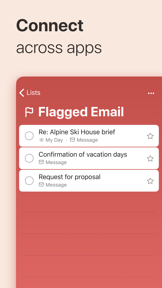
Syncs tasks and reminders across Outlook, Planner, and other Microsoft 365 services.
Collaborative task lists with real-time syncing for family, friends, and colleagues.
How much does it cost?
The app is provided free of charge as a utility to drive usage of the broader Microsoft 365 ecosystem.
Velocity
Maintenance developmentperformanceopaqueShow more...
The app ships approximately 0.12 releases per week, placing it firmly in the maintenance tier. Development is characterized by infrequent, minor updates focused exclusively on stability and bug fixes. There is no evidence of new feature development or live-ops activity in the observed data. The release cadence has remained stable but low over the last six months.
Who built it?
Microsoft
13+ apps tracked · Productivity
 Microsoft SharePoint
 Microsoft Defender: Security
 Microsoft Bing Search
 Microsoft Edge
 Microsoft OneDrive
 Xbox
Xbox Link to Windows
 Microsoft OneNote
 Microsoft Word
 Remote Help
 Microsoft Edge Dev
 Microsoft Events
User Sentiment
What do users think recently?
Review voice lately leans mixed. Users appreciate cross-platform synchronization between mobile and desktop keeps task management consistent for daily professional and personal use and simple and clean user interface allows for quick task entry without unnecessary friction or complex navigation menus, but report frequent application crashes and freezing during startup or task creation disrupt the daily productivity workflow for many users.
How are ratings & reviews evolving?
Weekly average review rating
What users say, by theme
- Cross-platform synchronization between mobile and desktop keeps task management consistent for daily professional and personal use
- Simple and clean user interface allows for quick task entry without unnecessary friction or complex navigation menus
- Categorization features allow users to effectively separate professional responsibilities from personal life and shopping lists
- Frequent application crashes and freezing during startup or task creation disrupt the daily productivity workflow for many users
120 of 1648 recent reviews analyzed · high confidence · Mixed overall
Read the full review analysisUnlock 2 more frustration themes and 3 user requests, each backed by review evidence.
Access the full report for freeCompetition
Competitive landscape for Microsoft To Do
How's the Productivity market?
Microsoft To Do maintains a presence in the productivity category, though its chart performance is inconsistent across regions. The lack of major updates in the last 6 months signals a maintenance-mode posture that risks losing ground to rivals with higher release velocities.
Read the market outlookThe rivals identified

By Google
Deep integration within the Google Workspace ecosystem and high-frequency release cadence make this the primary threat for daily task management.
- Native integration with Google Calendar and Gmail allows seamless task creation from email threads.
- High-velocity development cycle with 23 releases in six months ensures rapid feature iteration and stability.
- Minimalist interface design prioritizes quick capture over complex project management workflows.
 Google Keep - Notes and listsContender
 Any.do - To do list & CalendarContender
 TickTick:To-Do List & CalendarContender
Unlock the head-to-head verdict: where this rival wins, and where it loses.
Access the full report for freeThe Analyst's Read
Key takeaways for Microsoft To Do
Where is it heading?
The productivity market is shifting toward high-velocity feature iteration and AI-assisted workflows, leaving Microsoft To Do's maintenance-mode strategy increasingly exposed. Unless the team addresses core stability regressions, the app will continue to lose its competitive edge against rivals like Google Tasks that offer deeper ecosystem integration and faster response to user feedback.
- Persistent crashes and sync failures in the latest release erode user trust, leading to increased churn among long-term professional users.
- The current maintenance-mode release cadence leaves the app vulnerable to disruption by rivals with higher-frequency update cycles.
The SWOT
- My Day daily planning loop increases DAU/MAU ratio
- Microsoft 365 integration creates high switching costs for enterprise users
- Cross-platform sync ensures consistent access across mobile and desktop
- Native calendar grid view could capture users currently migrating to visual planners
- Undo-functionality would reduce churn from accidental task deletion
Next best moves
Audit sync engine because sync failures are a top-3 complaint → improve retention
+ 1 more prioritized moveThe counter-intuitive read
The app's maintenance-mode status is a strategic choice…
Read the full takeFeature gaps
Native calendar grid view (available in Google Tasks/TickTick but missing here) +1
Since the last report: The app's sentiment has shifted to mixed, and the product roadmap has been reoriented to prioritize sync stability and basic utility gaps like undo functionality.
Bottom line
Microsoft To Do retains users through its Microsoft 365 integration, but persistent crashes and sync issues threaten its long-term viability, so the PM must prioritize stability to prevent churn to higher-velocity rivals like Google Tasks.
Unlock 3 critical frictions, 2 market threats, 1 more prioritized move and the analyst’s take.
Access the full report for freeFAQ
Is Microsoft To Do free to use?
Does Microsoft To Do sync with Outlook?
What is a good alternative to Microsoft To Do?
Sources
Report last updated