


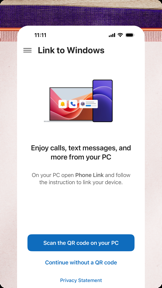

Link to Windows is a productivity utility that mirrors Android notifications, files, and apps onto Windows PCs.
The App DNA
What makes this app unique?
Users hire this app to eliminate the physical friction of switching between mobile and desktop devices during work tasks.
For Windows PC users who own Android or iOS devices and want to manage mobile content without switching hardware.
What does it look like?
Key features
Mirrors Android phone notifications, calls, and text messages to Windows PC interface
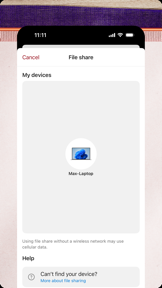
Drag-and-drop file transfer and instant photo access between Android and Windows PC
Access and run Android mobile apps directly on Windows PC screen
How much does it cost?
The app is free and functions as a utility to drive Windows PC usage and hardware ecosystem adoption.
Velocity
Active developmentperformanceopaqueShow more...
The app maintains an active development cadence, averaging approximately 0.7 releases per week across iOS and Android platforms. Despite this consistent delivery schedule, the release notes remain uniformly opaque, providing no insight into specific feature additions or changes. This pattern is consistent with apps that utilize server-side feature flags or A/B testing rather than traditional App Store-driven feature releases. Development appears stable, focusing exclusively on maintenance and performance optimization.
Who built it?
Microsoft
13+ apps tracked · Productivity
 Microsoft SharePoint
 Microsoft Defender: Security
 Microsoft Bing Search
 Microsoft Edge
 Microsoft OneDrive
 Xbox
Xbox Microsoft OneNote
 Microsoft Word
 Remote Help
 Microsoft Edge Dev
 Microsoft Events
 Work Folders
User Sentiment
What do users think recently?
Fresh user feedback skews frustrated. Users appreciate wireless file transfer functionality provides a quick and efficient way to move documents between devices, but report persistent connectivity failures require frequent manual restarts to maintain a link between mobile and computer.
How are ratings & reviews evolving?
What users say, by theme
- Wireless file transfer functionality provides a quick and efficient way to move documents between devices
- Persistent connectivity failures require frequent manual restarts to maintain a link between mobile and computer
100 of 231 recent reviews analyzed · high confidence · Frustrated overall
Read the full review analysisUnlock 1 more frustration theme and 1 user request, each backed by review evidence.
Access the full report for freeCompetition
Competitive landscape for Link to Windows
How's the Productivity market?
Link to Windows holds a #14 Free rank in the Productivity category, but the 3.75★ Android rating lags behind the 4.0★ iOS rating. This discrepancy signals that the core Android-to-Windows integration is currently failing to meet user expectations for stability.
Read the market outlookThe rivals identified

By ASUSTek
Both applications target users seeking to bridge mobile and PC workflows, with GlideX competing directly by offering screen extension and mirroring capabilities that overlap with the mobile app streaming feature in Link to Windows.
- GlideX provides screen extension functionality, turning mobile devices into secondary monitors for PC workflows.
- GlideX supports hardware-agnostic connectivity, whereas Link to Windows requires specific Windows PC and Android or iOS device compatibility.


Unlock the head-to-head verdict: where this rival wins, and where it loses.
Access the full report for freeThe Analyst's Read
Key takeaways for Link to Windows
Where is it heading?
The market for cross-device utilities is consolidating around stable, high-utility tools, and Link to Windows is currently losing ground to connectivity instability. Unless the engineering team addresses the handshake reliability, the app will continue to see declining sentiment, which threatens its long-term viability as a Windows ecosystem anchor.
- Persistent connectivity failures in the latest release erode the daily active habit, which compounds the rating drag already visible on Android.
- Forced-installation complaints indicate a growing brand liability that may trigger regulatory scrutiny or further negative sentiment in the coming quarters.
The SWOT
- System-level Android integration replaces default assistant on hardware-mapped triggers
- 21-language number-learning library functions as a B2B distribution moat into international preschool partnerships
- Education partnerships untapped as B2B distribution
- Wearable integration missing from current feature set
Next best moves
Audit connection handshake logic because connectivity failures are the #1 complaint theme → improve daily active habit
+ 1 more prioritized moveThe counter-intuitive read
The aggressive forced-installation strategy is a net-negative for long-term retention…
Read the full takeFeature gaps
Full remote desktop control (available in TeamViewer Remote Control but missing here) +1
Since the last report: The product is facing a decline in user trust due to persistent connectivity failures and forced-installation policies, despite maintaining a high-frequency update cadence.
Bottom line
Link to Windows holds its category lead through sticky integration mechanics but bleeds user trust due to connectivity instability and forced-installation policies, so revenue growth hinges on prioritizing connection reliability over aggressive distribution.
Unlock 3 critical frictions, 3 market threats, 1 more prioritized move and the analyst’s take.
Access the full report for freeReport last updated