


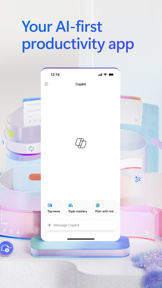
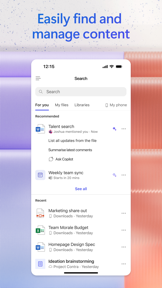



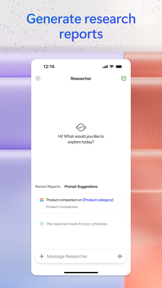

Microsoft 365 Copilot is an AI-first productivity app for work, enabling document creation, project management, and file access on iOS and Android.
The App DNA
What makes this app unique?
Users rely on the app to synthesize information and draft documents within the Microsoft 365 environment, but the recent unbundling of core services removes the unified workflow they depend on.
For Enterprise professionals and Microsoft 365 subscribers seeking mobile-first access to AI-assisted productivity tools.
What does it look like?
Key features
Natural language interface for drafting documents, summarizing content, and analyzing spreadsheets
Built-in Researcher and Analyst agents for generating research reports and analyzing complex datasets
Centralized workspace for aggregating ideas, documents, and links to synthesize information
How much does it cost?
Monetization is strictly gated by existing Microsoft 365 subscription tiers, positioning the app as a value-add for current enterprise and personal subscribers.
Velocity
Intense developmentperformanceopaqueShow more...
The app maintains an intense release cadence, shipping 5 updates over the last 47 days, averaging approximately 0.75 to 1 release per week. Despite this high frequency, the release notes are uniformly opaque, providing no insight into specific feature deployments or content updates. This pattern is consistent with a development strategy that relies on server-side feature flagging and A/B testing rather than traditional App Store-driven feature releases. The development trend is stable, focusing entirely on performance and quality maintenance.
Who built it?
Microsoft
13+ apps tracked · Productivity
 Microsoft SharePoint
 Microsoft Defender: Security
 Microsoft Bing Search
 Microsoft Edge
 Microsoft OneDrive
 Xbox
Xbox Link to Windows
 Microsoft OneNote
 Microsoft Word
 Remote Help
 Microsoft Edge Dev
 Microsoft Events
User Sentiment
What do users think recently?
The recent review mood reads frustrated. Users appreciate ai-powered assistance provides helpful information and project development support for professional users and integration with other applications creates a helpful workflow for users who rely on the suite, but report forced unbundling of core office applications creates unnecessary friction and storage bloat for mobile users.
How are ratings & reviews evolving?
What users say, by theme
- AI-powered assistance provides helpful information and project development support for professional users
- Integration with other applications creates a helpful workflow for users who rely on the suite
- Forced unbundling of core office applications creates unnecessary friction and storage bloat for mobile users
120 of 429 recent reviews analyzed · high confidence · Frustrated overall
Read the full review analysisUnlock 2 more frustration themes and 2 user requests, each backed by review evidence.
Access the full report for freeCompetition
Competitive landscape for Microsoft 365 Copilot
How's the Productivity market?
Microsoft 365 Copilot holds a #8 Grossing position in the Productivity category across multiple markets, yet the gap between its discovery advantage and the high churn rate signals monetisation friction. The app's reliance on existing Microsoft 365 licensing tiers creates a high barrier for new-user conversion compared to standalone AI rivals.
Read the market outlookThe rivals identified

By X Corp.
Both apps compete for the AI assistant market share, with Microsoft 365 Copilot targeting enterprise productivity workflows while Grok focuses on real-time information retrieval and conversational AI.
- Grok integrates real-time X data for live news, whereas Microsoft 365 Copilot focuses on internal document analysis.
- Grok offers an unfiltered AI persona, contrasting with the professional, enterprise-grade tone of Microsoft 365 Copilot.
- Grok includes native video generation tools, a feature currently absent from the Microsoft 365 Copilot mobile experience.
 ChatGPTContender
 Meta AI - Assistant & GlassesContender
 Claude by AnthropicContender
 Kai — AI Assistant & ResearchContender
 ChatOn AI - Chat Bot AssistantContender
 ChatBox AI - Chatbot AssistantContender
 Chatbot AI Assistant ChatPrimeContender
 Chatbot App - AI AssistantContender

Unlock the head-to-head verdict: where this rival wins, and where it loses.
Access the full report for freeThe Analyst's Read
Key takeaways for Microsoft 365 Copilot
Where is it heading?
The shift toward an AI-centric, unbundled app architecture has triggered a sharp decline in user sentiment. Restoring a streamlined, integrated workflow is critical to retaining users who prioritize core productivity over AI-first features.
- The latest update failed to address the widespread frustration regarding the unbundling of office services, driving continued negative sentiment.
- Technical instability and file access failures prevent users from opening or editing their documents, which compounds the churn risk.
The SWOT
- Enterprise-grade security and compliance controls built into the Microsoft identity stack
- Deep integration with the Microsoft 365 ecosystem increases switching costs for enterprise users
- Localized AI-assisted workflows for specific enterprise verticals
- Improved opt-out granularity for AI features to reduce user frustration
Next best moves
Restore unified file access because unbundling is the #1 complaint theme → reduce churn
+ 1 more prioritized moveThe counter-intuitive read
The unbundling strategy, while intended to drive individual app installs…
Read the full takeFeature gaps
System-wide keyboard integration (available in Grammarly but absent here) +1
Since the last report: The unbundling of core office services has triggered a persistent decline in user experience, characterized by technical instability and intrusive AI prompts that disrupt document workflows. While the rating saw a minor numerical increase, the qualitative feedback reflects deepening frustration with the app's shift away from a unified office suite.
Bottom line
Restoring a unified, stable document editing experience is critical to retaining professional users who prioritize core productivity over AI-first features.
Unlock 3 critical frictions, 2 market threats, 1 more prioritized move and the analyst’s take.
Access the full report for freeFAQ
Is Microsoft 365 Copilot free to use?
How does Microsoft 365 Copilot compare to ChatGPT?
Does Microsoft 365 Copilot work offline?
What are some alternatives to Microsoft 365 Copilot?
Sources
- [1] App Store, source
Report last updated