


QuickPlan - Project Gantt Plan
By 皓 李


QuickPlan is a project management tool for iPhone that enables Gantt chart planning via natural touch gestures.
The App DNA
What makes this app unique?
It removes the friction of navigating complex desktop-style project interfaces on small mobile screens.
For Project managers and professionals who require mobile-first Gantt chart planning with desktop-compatible file formats.
What does it look like?
Key features
Task creation and movement performed via touch gestures on the Gantt chart view.
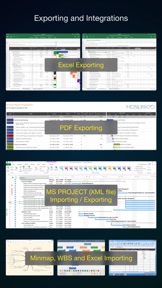
Import and export of project files in XML format for compatibility with desktop software.
Creation of project subsets for individual team members to facilitate granular task delegation.
How much does it cost?
The one-time purchase model at $8.99 positions QuickPlan as a professional tool, avoiding recurring subscription costs.
Velocity
Active developmentShow more...
5 versions in history. Development pace: active.
Who built it?
皓 李
5 apps tracked · Business
 OrgChartX - Organization Chart
 CostX - Work & Cost Estimate
 Organization Chart Management
 QuickPlanX: Project Gantt Plan
User Sentiment
What do users think recently?
Recent user voice shows a thrilled sentiment. Users appreciate intuitive gesture-based interface makes managing complex gantt charts accessible on small mobile device screens and one-time purchase model provides significant value compared to subscription-based project management software alternatives.
How are ratings & reviews evolving?
What users say, by theme
- Intuitive gesture-based interface makes managing complex Gantt charts accessible on small mobile device screens
- One-time purchase model provides significant value compared to subscription-based project management software alternatives
- Effective synchronization across multiple Apple devices supports professional project management workflows in the field
- Lack of a universal app purchase forces users to pay separately for iPad and iPhone versions
49 of 49 recent reviews analyzed · high confidence · Thrilled overall
Read the full review analysisUnlock 2 more frustration themes and 1 user request, each backed by review evidence.
Access the full report for freeCompetition
Competitive landscape for QuickPlan - Project Gantt Plan
How's the Business market?
QuickPlan holds a stable position in the Business category, maintaining a 4.74 rating across 398 reviews. Its $8.99 price point provides a clear alternative to subscription-based rivals, though the absence of a universal purchase model limits its appeal for users across the full Apple device fleet.
Read the market outlookThe rivals identified

By Microsoft Corporation
Microsoft Planner competes for project management users by bundling task tracking into the Microsoft 365 suite, creating a direct alternative for teams already paying for enterprise software.
- Microsoft Planner offers AI-assisted planning via Copilot, while QuickPlan relies on manual gesture-based scheduling.
- Microsoft Planner provides multiple project views including Kanban and Grid, whereas QuickPlan focuses primarily on Gantt charts.
- Microsoft Planner requires a monthly subscription, while QuickPlan offers a one-time purchase model for project management.
 Zoho Projects Work ManagementContender
 MeisterTask - Task ManagementContender
 iGanttChart: Gantt Chart AppContender
 Projectholic: Project PlannerContender
 TeamGantt CompanionContender
 Project Plan 365Contender
 Tasks WizardContender
 Merlin Project: Gantt + KanbanContender


Unlock the head-to-head verdict: where this rival wins, and where it loses.
Access the full report for freeThe Analyst's Read
Key takeaways for QuickPlan - Project Gantt Plan
Where is it heading?
The mobile project management market is consolidating around tools that offer seamless cross-device workflows. QuickPlan's reliance on local storage and manual sync leaves it exposed to rivals that offer deeper cloud integration, so the PM must prioritize universal purchase and cross-device continuity to maintain its competitive edge.
- High user satisfaction with the gesture-based interface drives strong organic ratings, sustaining the app's visibility in the Business category.
- The lack of a universal purchase model creates recurring user frustration, which risks long-term brand perception as the app matures.
The SWOT
- Gesture-driven Gantt interface reduces learning curve on small screens
- Microsoft Project XML interoperability enables professional enterprise workflows
- Dedicated Mac companion app would capture users managing large-scale projects
Next best moves
Ship universal app purchase because it is the top-cited user complaint → reduce purchase friction
+ 1 more prioritized moveThe counter-intuitive read
The lack of a universal app purchase is…
Read the full takeFeature gaps
Integrated Kanban boards (available in Merlin Project but absent here) +1
Since the last report: QuickPlan has shifted its market positioning to emphasize a one-time purchase model and gesture-based Gantt planning as primary differentiators. This transition highlights a clear value proposition against subscription-based rivals, though it simultaneously surfaces user friction regarding the lack of universal app support.
Bottom line
QuickPlan's gesture-based interface provides a distinct mobile advantage, but the lack of a universal purchase model creates unnecessary friction. Addressing this purchase experience would solidify its standing against subscription-based rivals and improve user retention.
Unlock 2 critical frictions, 1 market threat, 1 more prioritized move and the analyst’s take.
Access the full report for freeFAQ
Is QuickPlan compatible with Microsoft Project?
Does QuickPlan require a subscription?
How does QuickPlan compare to Project Plan 365?
Can I use QuickPlan on both my iPhone and iPad?
Sources
- [1] App Store
Report last updated