



Microsoft Planner is a visual task management solution built for the Microsoft 365 ecosystem, targeting enterprise teams that require a collaborative, Kanban-style interface. It positions itself as a professional-grade tool that integrates seamlessly with Teams and Outlook, offering a more structured alternative to simple to-do lists. Its primary differentiator is the integration of Microsoft 365 Copilot, which provides AI-assisted planning and project insights directly within the workflow.
The App DNA
What makes this app unique?
For Enterprise and business teams using the Microsoft 365 ecosystem who require scalable, collaborative project and task management.
What does it look like?
Key features
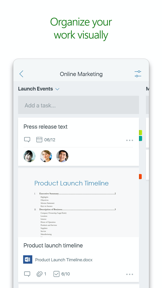
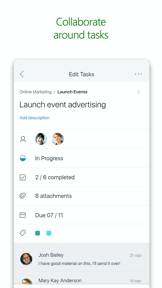
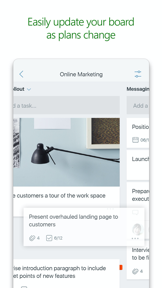
Organize tasks into buckets on boards with drag-and-drop functionality
AI-assisted planning, goal setting, and project insights
Centralized dashboard for My Day, My Tasks, and My Plans across the M365 ecosystem
How much does it cost?
Monetization is tied strictly to enterprise/business subscriptions, positioning the app as a professional-grade tool rather than a standalone consumer product.
Velocity
Who built it?
Microsoft
13+ apps tracked · Productivity
 Microsoft SharePoint
 Microsoft Defender: Security
 Microsoft Bing Search
 Microsoft Edge
 Microsoft OneDrive
 Xbox
Xbox Link to Windows
 Microsoft OneNote
 Microsoft Word
 Remote Help
 Microsoft Edge Dev
 Microsoft Events
User Sentiment
What do users think recently?
Fresh user feedback skews frustrated. Users appreciate productivity utility and cross-platform integration, but report premium plan incompatibility.
How are ratings & reviews evolving?
What users say, by theme
- Productivity Utility
- Cross-Platform Integration
Unlock 1 more frustration theme, each backed by review evidence.
Access the full report for freeCompetition
Competitive landscape for Microsoft Planner
How's the Productivity market?
The rivals identified

By monday.com Ltd.
Directly competes for enterprise project management budgets with highly visual, customizable workflows and deep integration capabilities.
Microsoft Planner vs monday - Work Platform Trello: Daily Task TrackerNemesis
 Asana: Work ManagementNemesis
 Wrike - Where Work FlowsNemesis
 Notion: Notes, Tasks, AIContender
 Todoist: To Do List & CalendarContender
 Archive: Document ScannerContender
 Smartsheet: Projects & TeamsContender
 ZenkitContender
Show 6 more
Unlock the deeper market read.
Access the full report for freeThe Analyst's Read
Key takeaways for Microsoft Planner
Where is it heading?
The SWOT
- Deep Microsoft 365 ecosystem integration
- Advanced AI capabilities via Copilot
- Visual flexibility with multiple project views (Gantt, Kanban, Grid)
- Achieve mobile-web feature parity to retain enterprise users
- Expand AI-driven automated scheduling
- Improve cross-app task unification within M365
Since the last report: Microsoft Planner has pivoted to an AI-centric value proposition with the integration of Copilot and a more transparent, tiered enterprise pricing model.
Unlock 3 critical frictions, 3 market threats and the analyst’s take.
Access the full report for freeReport last updated