






Samsung Print Service Plugin is a system-level Android utility that enables wireless printing to various printer brands via Mopria technology.
The App DNA
What makes this app unique?
It removes the friction of downloading manufacturer-specific tools for everyday document printing, serving as a default utility for Samsung Galaxy users.
For Samsung Galaxy users and Android owners requiring mobile document and photo printing capabilities.
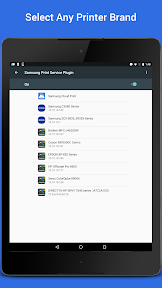
What does it look like?
Key features
Enables wireless printing to a wide range of printer brands via the Android Print Framework.
Integrates into the Android share menu for apps like Chrome and Gmail.
Comes pre-loaded on Samsung Galaxy devices, removing the need for manual installation.
How much does it cost?
The app is a free system utility provided by the manufacturer to support hardware usage.
Velocity
Maintenance developmentperformanceShow more...
The app is currently in a maintenance phase, with only one release identified in the recent window. Development is focused exclusively on security, reliability, and defect resolution rather than new feature expansion. With the latest update occurring 84 days ago, the release cadence remains infrequent and stable. There is no evidence of live operations or active feature development.
Who built it?
ALI Furqan
13+ apps tracked · Productivity
 HP Poly Studio Mobile
 HP Advance
 HP Samsung Mobile Print
 HyperX NGENUITY
 HP LIFE
 HP Sure Admin
 HP PrintOS Production Hub
 HP Smart Printer App ™
 AI PPT Maker : Gamma AI App
 SharkCode: Codex & Claude Code
 QuizMind AI - Quiz & Flashcard
 Cutfiles Hub - SVG Cut Files
User Sentiment
What do users think recently?
Review voice lately leans frustrated. Users appreciate mobile printing functionality provides a convenient way to convert web pages into portable document formats, but report frequent printer connection failures and discovery issues prevent users from completing basic printing tasks reliably.
How are ratings & reviews evolving?
Weekly average review rating
What users say, by theme
- Mobile printing functionality provides a convenient way to convert web pages into portable document formats
- Frequent printer connection failures and discovery issues prevent users from completing basic printing tasks reliably
76 of 76 recent reviews analyzed · high confidence · Frustrated overall
Read the full review analysisUnlock 1 more frustration theme and 1 user request, each backed by review evidence.
Access the full report for freeCompetition
Competitive landscape for Samsung Print Service Plugin
How's the Productivity market?
The app maintains a presence in the Productivity category across multiple regions, including a #196 rank in the UK and #161 in Germany. Its reliance on wireless discovery creates a competitive gap versus hardware-locked plugins that offer more stable, native experiences.
The rivals identified

By Canon Inc.
As the most widely adopted manufacturer-specific print plugin with over 576k ratings, it represents the primary alternative for users seeking native system-level printing integration.
- Deep-level OS integration provides a seamless native print experience that third-party apps cannot replicate.
- Hardware-specific optimization ensures superior color management and finishing options for Canon-branded printer users.
- Maintains a consistent, low-friction update cycle that keeps pace with Android OS security and API changes.

Unlock the head-to-head verdict: where this rival wins, and where it loses.
Access the full report for freeThe Analyst's Read
Key takeaways for Samsung Print Service Plugin
Where is it heading?
The mobile printing market is consolidating around hardware-specific plugins that offer superior stability and finishing controls. Samsung Print Service Plugin remains exposed due to its reliance on generic wireless discovery, which is failing to keep pace with modern Android stability requirements.
- Persistent printer discovery failures and service crashes in the latest update prevent reliable printing, which directly erodes user trust.
- The app remains in maintenance mode with no new feature builds, focusing only on security and platform support updates.
The SWOT
- Pre-installed status on Samsung Galaxy devices creates a high-utility default
- Adding direct USB printer support would bypass unreliable wireless discovery
Next best moves
Audit printer discovery handshake because discovery failures are the top complaint → reduce connection drops
+ 1 more prioritized moveThe counter-intuitive read
The app's pre-installed status is its greatest liability: because it cannot be uninstalled…
Read the full takeFeature gaps
Direct USB printer connection (available in competitor utilities but absent here) +1
Since the last report: The app's competitive position has declined as the update cadence slowed to 84 days and negative sentiment solidified into a high-confidence trend of printer discovery failures and system crashes.
Bottom line
Prioritizing stability in the printer discovery handshake is essential to stop the current trend of negative sentiment, as the app's utility is currently undermined by its own instability.
Unlock 2 critical frictions, 1 market threat, 1 more prioritized move and the analyst’s take.
Access the full report for freeFAQ
Is Samsung Print Service Plugin compatible with non-Samsung printers?
Why can't my phone find my printer?
How does this compare to Canon Print Service?
Can I uninstall the Samsung Print Service Plugin?
Sources
- [1] Play Store listing, source
Report last updated