



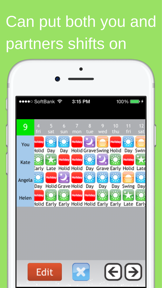
Shift Planning Calendar is a productivity utility for shift workers to manage and share schedules on iOS.
The App DNA
What makes this app unique?
Users hire this app to eliminate the manual labor of calendar entry and shift sharing, replacing complex scheduling with one-touch icon inputs.
For Shift workers and their families who require coordinated scheduling and quick sharing of work hours.
What does it look like?
Key features
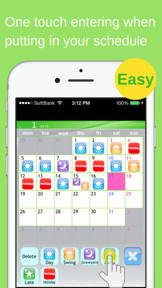
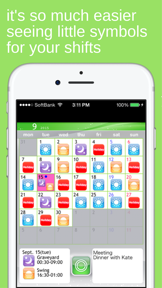
One-touch icon-based entry for monthly shift scheduling
Side-by-side comparison of shift schedules for multiple users
One-touch generation of shift schedule emails for external sharing
How much does it cost?
The app operates as a free utility with no ad-supported or paid-tier gates, relying on organic growth.
Velocity
Dormant developmentopaqueShow more...
The app has been in a state of total inactivity for more than six years, with no updates recorded since April 2020. Given the lack of any release activity in the last 73 months, the development momentum is classified as zombie. There is no evidence of ongoing maintenance, feature development, or live operations.
Who built it?
Kosuke Hamada
5 apps tracked · Productivity
 Calendario de Turnos = Pro =
 SHIFTAR: Work schedule planner
 HomeScreen Calendar Widget
 SHIFTAR: Work schedule planner
User Sentiment
What do users think recently?
Fresh user feedback skews excited. Users appreciate ease of use and speed of input, but report lack of modern widget and sync features.
How are ratings & reviews evolving?
What users say, by theme
- Ease of use and speed of input
- Lack of modern widget and sync features
Competition
Competitive landscape for Shift Planning Calendar
How's the Productivity market?
The app maintains a 4.73 rating across 806 reviews, but the lack of updates since 2020 signals a stagnant market position relative to active competitors.
Read the market outlookThe rivals identified
By Gunia UG (haftungsbeschränkt)
CalenGoo is a direct threat due to its massive user base and deep integration of task management within a calendar interface, directly competing for the productivity-focused shift worker.
- Direct sync engine provides superior reliability compared to standard calendar API implementations used by target.
- Advanced task-in-event integration allows users to manage complex to-do lists directly within their shift schedule.
- Massive scale and long-term market presence create a significant barrier to entry for niche competitors.
 Cat Calendar:Schedule PlannerContender
 Teamup CalendarContender
 My Shift Planner - CalendarContender
 WidgetCal-Calendar WidgetContender
Unlock the head-to-head verdict: where this rival wins, and where it loses.
Access the full report for freeThe Analyst's Read
Key takeaways for Shift Planning Calendar
Where is it heading?
The shift-planning market is consolidating around apps that leverage native OS capabilities, leaving this app exposed as a legacy utility. Without a roadmap to address the 4-year update gap, the app will continue to lose ground to competitors that offer modern sync and widget features.
- The lack of updates since 2020 signals abandonment to users, which accelerates churn to active competitors like Turnify.
- Competitors are aggressively adopting native iOS features like Live Activities, which makes this app feel dated and increases churn risk.
The SWOT
- One-touch icon entry reduces scheduling friction
- Ad-free model builds high user trust
- Side-by-side list view facilitates family coordination
- Implement lock-screen widgets to match WidgetCal
- Add cloud-sync to reduce churn to CalenGoo
Next best moves
Ship lock-screen widget support because user reviews flag lock-screen access as a top missing feature → increase daily retention.
+ 1 more prioritized moveThe counter-intuitive read
The app's lack of updates is not just…
Read the full takeFeature gaps
Lock screen widgets (available in WidgetCal but absent here) +2
Since the last report: The app remains in a maintenance-free state, but user feedback and competitive pressure have crystallized around the lack of modern iOS integrations like widgets and cloud sync.
Bottom line
The app retains users through simplicity, but the lack of updates since 2020 creates a terminal risk against modern rivals, so the PM must prioritize basic OS-level integrations to prevent further churn.
Unlock 3 critical frictions, 3 market threats, 1 more prioritized move and the analyst’s take.
Access the full report for freeReport last updated