



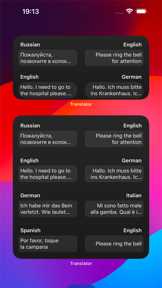


Translator is a free, multi-language translation utility for iOS and Android that supports voice, camera, and text-based communication.
The App DNA
What makes this app unique?
Users hire the app for real-time, low-friction communication during travel and language learning, but the recent removal of offline capabilities forces them to seek more reliable alternatives.
For Students, educators, and travelers requiring real-time, multi-language communication support.
What does it look like?
Key features
Real-time translation for group interactions using a shared conversation code across devices
Instant translation of physical text or documents via camera input
Displays translation on a full-screen card for visibility during in-person interactions
How much does it cost?
The app is provided free of charge as a utility to support the broader Microsoft 365 and Education ecosystem.
Velocity
Dormant developmentopaqueShow more...
The app has been effectively dormant for over a year and a half, with no releases recorded since October 2025. The development history shows a significant gap between the major iOS rebuild in May 2024 and the subsequent minor Android update. There is no evidence of active maintenance, feature development, or live operations. The project appears to be in a zombie state due to the lack of updates for more than 12 months.
Who built it?
HurryApp
13+ apps tracked · Reference
 Python3ide
 HTML Viewer ++
 Keyboard Font: Ai Stickers
 Email Client App
 News RSS
 Strike Writer & Publisher
 Cappuccino
 Image Editor App +
 PDF Compressor
 JavaScript Coding Editor IDE
 Calendar
 Outline
User Sentiment
What do users think recently?
Fresh user feedback skews frustrated. Users appreciate core translation accuracy provides significant value for users navigating foreign languages during travel, but report recent interface changes following the latest update have removed essential features and increased navigation friction.
How are ratings & reviews evolving?
What users say, by theme
- Core translation accuracy provides significant value for users navigating foreign languages during travel
- Recent interface changes following the latest update have removed essential features and increased navigation friction
51 of 51 recent reviews analyzed · high confidence · Frustrated overall
Read the full review analysisUnlock 1 user request, each backed by review evidence.
Access the full report for freeCompetition
Competitive landscape for Translator
How's the Reference market?
The rivals identified

By Google
With over 9 million ratings and a massive release cadence of 23 updates in six months, this is the definitive market leader in the translation space.
- Deep integration with the Google ecosystem allows for seamless cross-platform translation across web and mobile.
- Massive language support and offline translation capabilities provide a utility baseline that is difficult to replicate.
- Frequent update cycle ensures rapid deployment of new neural machine translation models and language pair improvements.


Unlock the head-to-head verdict: where this rival wins, and where it loses.
Access the full report for freeThe Analyst's Read
Key takeaways for Translator
Where is it heading?
The translation market is consolidating around high-fidelity, multi-modal tools, and Translator's recent UI overhaul has left it exposed by removing essential offline capabilities. Without a rapid restoration of these features, the app will continue to lose its travel-segment base to Google Translate, which maintains a more consistent update cadence.
- The removal of offline translation mode forces users to rely on active network connections, which increases churn among travelers in low-connectivity areas.
- Regression in linguistic features like Pinyin transliteration hinders utility for Chinese language learners, driving them toward more specialized reference tools.
The SWOT
- Microsoft 365 integration provides a B2B distribution path
- Multi-device conversation enables group-setting adoption
- Re-integrating Pinyin transliteration captures the Chinese-learning segment
- Adding automatic language detection reduces input friction
Next best moves
Restore offline language packs because users cite this as the primary reason for uninstalling → stabilize travel-segment retention
+ 1 more prioritized moveThe counter-intuitive read
The UI redesign's focus on simplicity is a…
Read the full takeFeature gaps
Offline translation mode (available in Google Translate but missing here) +1
Since the last report: The app underwent a disruptive UI overhaul that removed core offline and linguistic features, leading to negative sentiment and increased churn.
Bottom line
Translator holds its category lead through sticky multi-device mechanics but bleeds travel-segment users due to the removal of offline mode, so revenue growth hinges on restoring functional parity to stop churn.
Unlock 2 critical frictions, 2 market threats, 1 more prioritized move and the analyst’s take.
Access the full report for freeReport last updated